







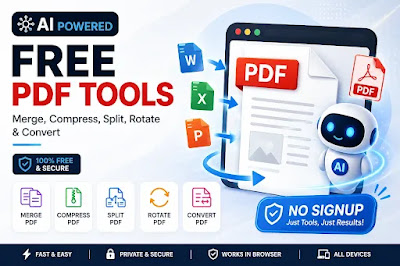
Free PDF Tools: Merge, Compress, Split, Rotate & Convert (No Signup)
FREE · NO UPLOAD · RUNS ON YOUR DEVICE Merge, split, compress and rotate PDFs, convert JPG/PDF/Word files back and forth, and swap image formats — all inside this page. Nothing you drop here is ever uploaded to a server.
Drop files here or click to browse
Working… Files are processed with JavaScript directly in your browser tab and are discarded when you leave the page. Nothing is stored or transmitted. Word↔PDF conversions are best-effort (text and basic formatting only) since there’s no full Word engine in the browser.File Tools
How to Use These PDF Tools
- Choose a tool — click the tab for what you want to do (Merge PDF, Compress PDF, Split PDF, etc.) at the top of the tool box.
- Add your file(s) — drag and drop into the box, or click it to browse and select from your device.
- Adjust settings if needed — reorder or rotate pages for Merge/Split, choose a compression level, or pick an output format.
- Click Convert — your file is processed instantly in your browser, with a progress bar showing status.
- Download your result — the file size is shown right next to the download button.
No account, no email, no waiting in a queue.
Frequently Asked Questions
How do I merge PDF files online for free?
Click the "Merge PDF" tab, upload two or more PDFs, drag them into the order you want, and click Convert. Your merged file downloads instantly.
How do I compress a PDF without losing too much quality?
Open "Compress PDF," upload your file, and use the slider to pick a compression level — lower percentages keep more quality, higher percentages create a smaller file. A before/after size comparison is shown after conversion.
Can I split a PDF into separate pages?
Yes. Open "Split PDF," select the pages you want, and choose whether to export them as one PDF or as separate PDF files (delivered as a .zip).
How do I rotate a PDF page?
Use the "Rotate PDF" tool and click "Rotate" under any page thumbnail to turn it 90° at a time, or use "Rotate all" to turn the whole document. You can also rotate individual pages directly inside Merge PDF or Compress PDF before converting.
How do I convert JPG to PDF or PDF to JPG?
Use "JPG to PDF" to turn one or more images into a single PDF, or "PDF to JPG" to export every page of a PDF as an image.
Can I convert Word to PDF or PDF to Word here?
Yes — "Word to PDF" converts .docx files to PDF, and "PDF to Word" extracts the text from a PDF into an editable .docx file. Complex layouts, tables, and images may not carry over perfectly, since this runs entirely in your browser without a full Word engine.
Is it safe to use — are my files uploaded anywhere?
No. Every tool works entirely on your device using your browser. Files are never uploaded to a server, so nothing about your documents leaves your computer or phone.
Is there a file size or usage limit?
No sign-up and no daily limit. Very large files may take a little longer since everything is processed on your own device.
Do I need to install any software or extension?
.webp "Free PDF Tools Merge, Compress, Split, Rotate & Convert (No Signup)")
No. It works directly in your browser — desktop or mobile — no installation needed.